
Bidders & Contractors
Read the documents and keep up with addenda
Use the project’s document list to prepare your response from the published information.
See it in action
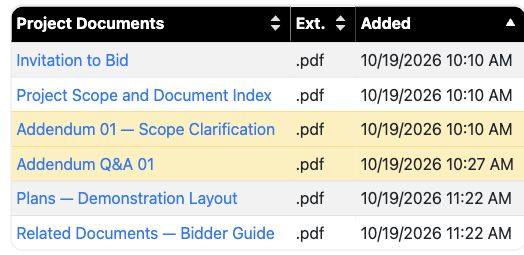
Find the current project files
The document list keeps the plans, scope, related documents and addendum together for participants.
 View full-size screenshot ↗
Actual application screens from synthetic Cedar Harbor demonstration projects.
Download the files you need
Review the plans, project scope, related documents and addendum. Select multiple files when you want to download them together.
Watch for updates
Return to the project for addenda. We do attempt to email plan holders. Read updates before submitting, even if you downloaded the original documents earlier.
Acknowledge applicable addenda
Response forms can ask you to acknowledge the current addenda. Confirm that you have read the listed updates before answering.
Keep the project context
The project detail page brings documents, schedules and response links together. Check the deadline for your submission, including its displayed time zone.
Your next steps
- Open the project and review its description and schedule.
- Download the current documents and any updates.
- Use those documents when completing your response.
Need help with a project?
Contact Projectdog for help with your account, project access or the submission workflow. Check the project’s published instructions and deadlines before submitting.
Contact Projectdog