
Bidders & Contractors
Ask a question, get an answer when published
When online Q&A is enabled, you can ask questions directly to the Project Team.
See it in action
Find the Q&A icon on Project Detail
This is where you go to ask a question. The Q&A icon appears on Project Detail when online Q&A is available for the project.
 View full-size screenshot ↗
Check answered questions
Check Previous Questions with Answers first. Your question may already have a published answer.
 View full-size screenshot ↗
Check unanswered questions
Next, check Unanswered Questions. Another participant may already have asked your question, and an answer may already be in process.
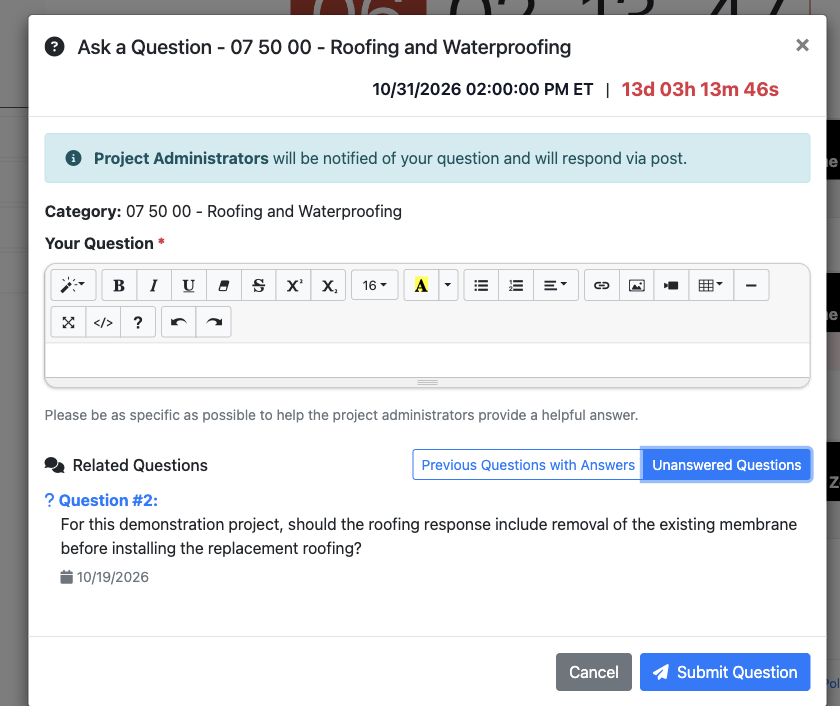 View full-size screenshot ↗
Submit a new question
If your question has not been covered, write a clear, specific question and select Submit Question before the question deadline.
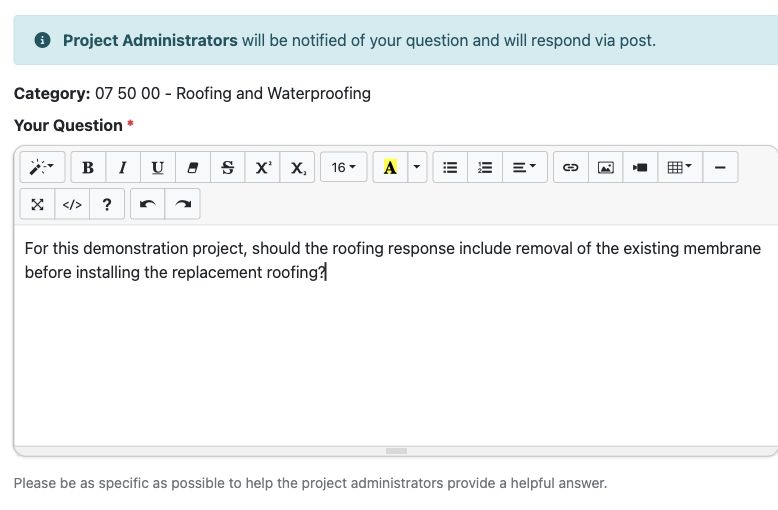 View full-size screenshot ↗
Actual application screens from synthetic Cedar Harbor demonstration projects.
Ask before the question deadline
Open the project’s question option, read the instructions and submit a clear question before the applicable deadline. Question deadlines may differ from submission deadlines.
Read the posted answers
The question modal has Previous Questions with Answers and Unanswered Questions views. Check them before composing another question. Published answers may also be issued via addendum with a linked Q&A document.
Include clarifications in your response
Read the answer alongside the related documents and addenda. A published clarification can affect what you need to provide.
Your next steps
- Find the Q&A icon on Project Detail when online Q&A is available.
- Check Previous Questions with Answers to see whether your question has already been answered.
- Check Unanswered Questions to see whether an answer to the same question may already be in process.
- If your question has not been covered, write it and select Submit Question before the question deadline.
Need help with a project?
Contact Projectdog for help with your account, project access or the submission workflow. Check the project’s published instructions and deadlines before submitting.
Contact Projectdog