
Bidders & Contractors
Find the results available for your project
Return to the project to see the submission results that have been released to the public.
See it in action
Read the official trade result
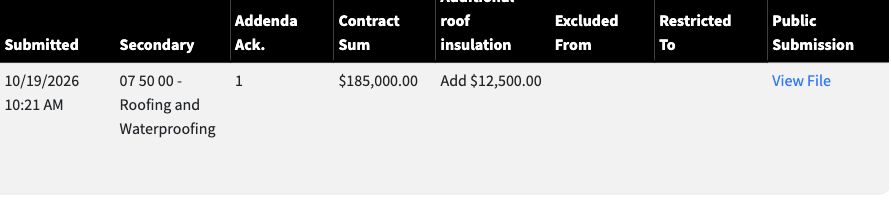
The example shows a posted trade amount and public submission file.
 View full-size screenshot ↗
Actual application screens from synthetic Cedar Harbor demonstration projects.
Follow the project’s release process
Received responses and published official results are different stages. What you can see depends on the project’s process, access rules and results status.
Read the published amounts
Official results can show categories, bid amounts, alternates and addendum acknowledgments. Open the available public submission files when you need the supporting document.
Use results for the next stage
Where Sub-Bid for GC Use applies, eligible official trade results feed the general-bid selection stage. Review the current results before making your selection.
Your next steps
- Open the project’s available results link.
- Review the published amounts and supporting files.
- Use the eligible official trade results if preparing a connected general bid.
Need help with a project?
Contact Projectdog for help with your account, project access or the submission workflow. Check the project’s published instructions and deadlines before submitting.
Contact Projectdog