
Bidders & Contractors
Complete a Survey/Interest Form
Share your interest, qualifications and supporting information in the categories relevant to your work.
See it in action
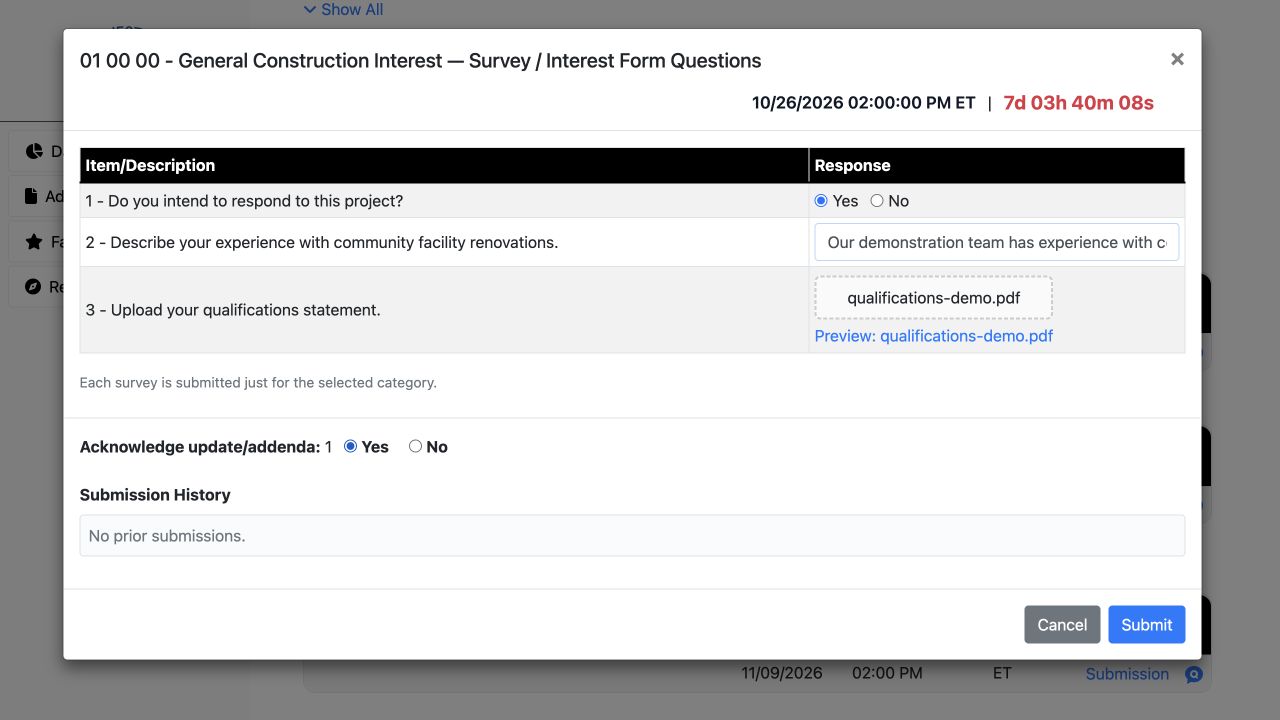
Complete the form in one place
Answer the questions, attach qualifications and acknowledge the addendum before submitting.
 View full-size screenshot ↗
Actual application screens from synthetic Cedar Harbor demonstration projects.
Choose the applicable category
Review the available Survey/Interest Form categories and their deadlines. Category descriptions help you choose the right response.
Answer and attach
Complete written answers and Yes/No questions, then upload the requested supporting files. Follow any conditional instructions and acknowledge the applicable addenda.
Check your response status
After submitting, check the project’s response status. Project Administrators can review the answers and supporting material.
Correct a response when permitted
A rejected response can be corrected and resubmitted when the deadline and project rules allow it. Previous submissions and review history remain part of the record.
Your next steps
- Open the applicable category.
- Answer the questions and attach the requested files.
- Submit and check the recorded status.
Need help with a project?
Contact Projectdog for help with your account, project access or the submission workflow. Check the project’s published instructions and deadlines before submitting.
Contact Projectdog