
Bidders & Contractors
Prepare a General/Prime Bid
Bring your proposal, required amounts and any applicable trade selections into one response.
See it in action
Prepare a General/Prime Bid
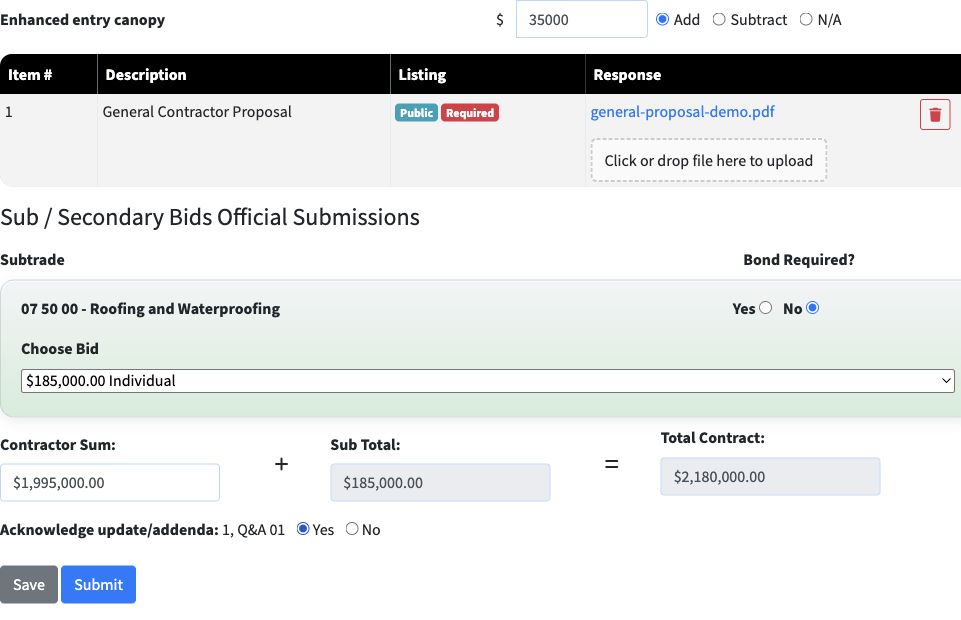
In the General/Prime Bid form, use Choose Bid for each required trade and answer Bond Required. This example selects the $185,000 roofing bid.
 View full-size screenshot ↗
Review your complete response
Check the proposal, alternate, official trade selection and calculated Total Contract.
 View full-size screenshot ↗
Confirm final submission
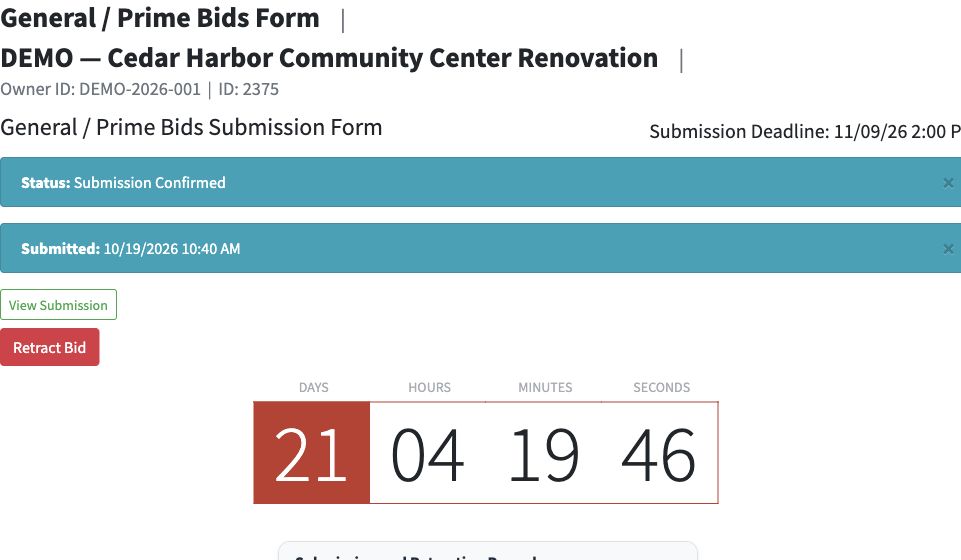
The confirmation shows the submitted time and a View Submission link. Keep this confirmation and open your submitted package to verify the response.
 View full-size screenshot ↗
Actual application screens from synthetic Cedar Harbor demonstration projects.
Provide the requested amounts
For On-Screen Entry, enter the Contractor Sum and any alternates. For OCR PDF Capture, complete the project’s coded Bid Form and review the recognized values. File-only projects collect the requested files.
Attach the required documents
Upload each requested file under the correct requirement. Public and confidential labels identify how the project classifies that material.
Complete connected trade selections
When Sub-Bid for GC Use applies, review the published official trade results, choose an eligible bid for each required trade or use a configured Owner allowance, and answer the bond questions. Some trade bids restrict who can use them. The form combines the selected trade amounts with your Contractor Sum to calculate the Total Contract.
Know when this applies
Independent Submission keeps primary and secondary bids independent. Only projects using Sub-Bid for GC Use require this connected selection process.
Finish with a submission confirmation
Check your response and addendum acknowledgments, then select Submit before the deadline. The confirmed submission provides a timestamp and a link to the submitted package.
Your next steps
- Read the primary requirements and prepare your files.
- Complete amounts, alternates and applicable trade selections.
- Submit and keep the confirmation.
Need help with a project?
Contact Projectdog for help with your account, project access or the submission workflow. Check the project’s published instructions and deadlines before submitting.
Contact Projectdog