
Project Teams & Administrators
Collect General/Prime Bids with the required information
Bring the primary response requirements together so Bidders can prepare a complete submission.
See it in action
See the response your requirements create
Bidder-facing example: the form collects the proposal and alternate, then combines an official trade selection with the Contractor Sum.
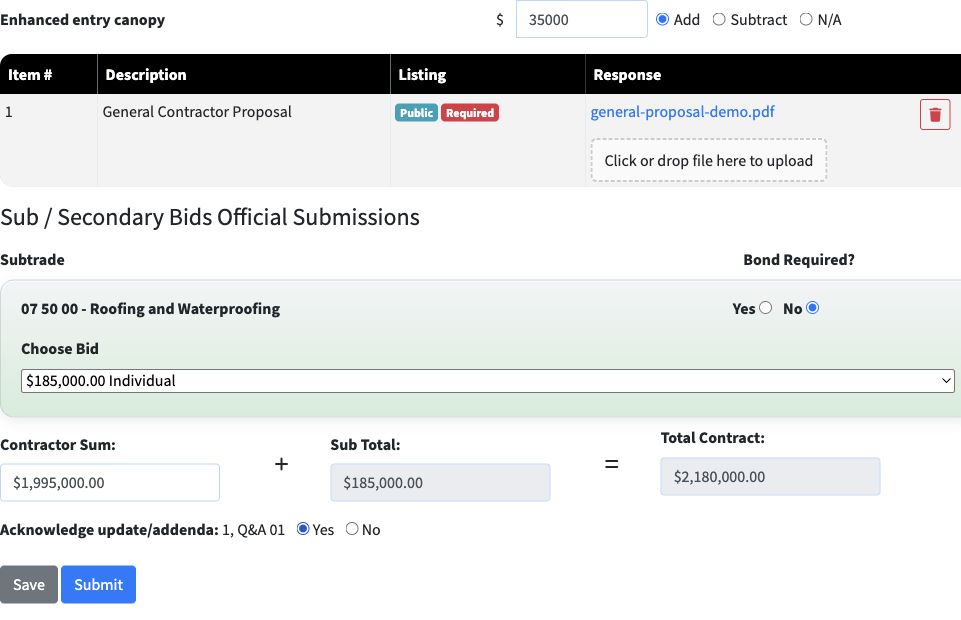 View full-size screenshot ↗
Actual application screens from synthetic Cedar Harbor demonstration projects.
Specify what the response needs
Prepare requested files and their public or confidential classification. Structured capture can collect a Contractor Sum and alternates; OCR capture uses the project’s coded PDF Bid Form.
Choose the procurement process
Independent Submission keeps the primary bid separate. Sub-Bid for GC Use connects eligible official trade selections to the general response. Work with Projectdog on the process relevant to your project.
Make connected totals clear
For Sub-Bid for GC Use, the response combines the Contractor Sum and selected trade totals. Each required trade needs an eligible official bid or configured Owner allowance, with the applicable bond answer.
Retain the response package
Final submission creates the response package for the selected process and capture method. The participant receives confirmation, while your team follows the applicable review and results workflow.
Your next steps
- Confirm the primary amounts, alternates and file requirements.
- Publish the requirements and any connected trade stage.
- Review responses through the project’s results workflow.
See this workflow for your project
Discuss your procurement process with Projectdog and request a demonstration of the configuration relevant to your project.
Request a demonstration