
Project Teams & Administrators
Set up the opportunity around your project
Define what participants need to know, when they can participate and which responses you need to collect.
See it in action
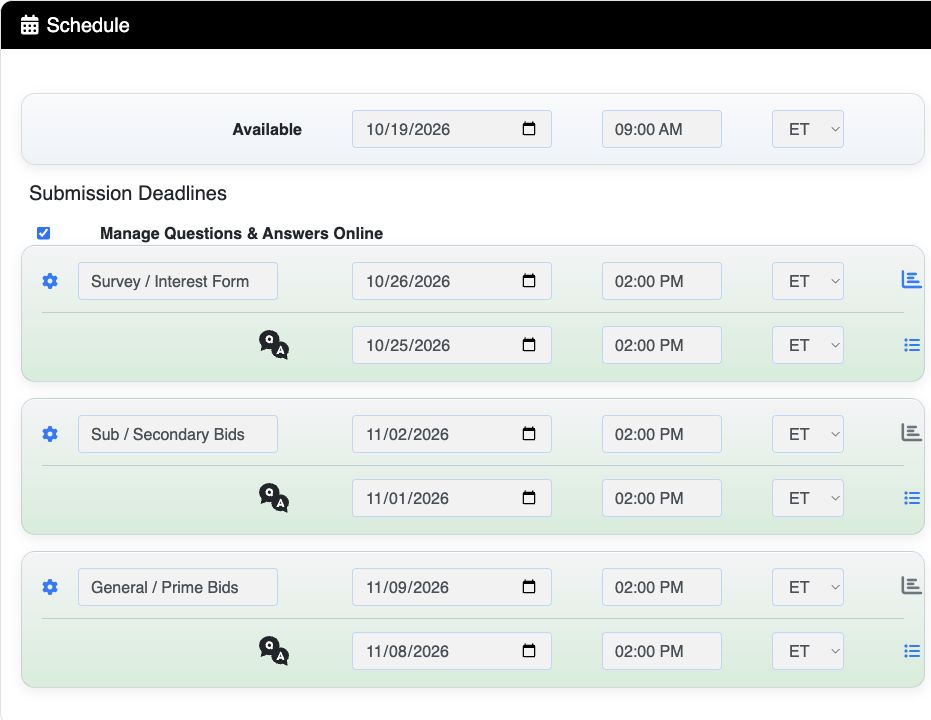
Set deadlines for each stage
The example shows separate Survey/Interest Form, Sub/Secondary Bid and General/Prime Bid deadlines with time zones.
 View full-size screenshot ↗
Actual application screens from synthetic Cedar Harbor demonstration projects.
Describe the opportunity
Set the title, Owner project number, location, estimate and description. Give participants enough context to decide whether the work fits their organization.
Choose how participants gain access
Open access lets eligible users find the opportunity. Closed access limits participation to the project’s permitted users. Password-controlled access adds a project password where that mode is used.
Host documents or collect responses
Document hosting provides a place for files and updates. Response collection can add three modules: Survey/Interest Form for interest and qualifications; Sub/Secondary Bids for trade responses; General/Prime Bids for the primary response.
Make deadlines clear
Set availability and the applicable module and question deadlines, with explicit time zones. Survey/Interest Form and secondary categories can have their own schedules, helping the team organize distinct response stages.
Your next steps
- Confirm the project information and access approach.
- Work with Projectdog to prepare the required modules and response process.
- Review the schedule and documents before the opportunity is posted.
See this workflow for your project
Discuss your procurement process with Projectdog and request a demonstration of the configuration relevant to your project.
Request a demonstration