
Project Teams & Administrators
Collect reviewed bid values from a PDF Bid Form
Use OCR PDF Capture when your process needs a completed PDF alongside structured amounts.
See it in action
See the verification Bidders complete
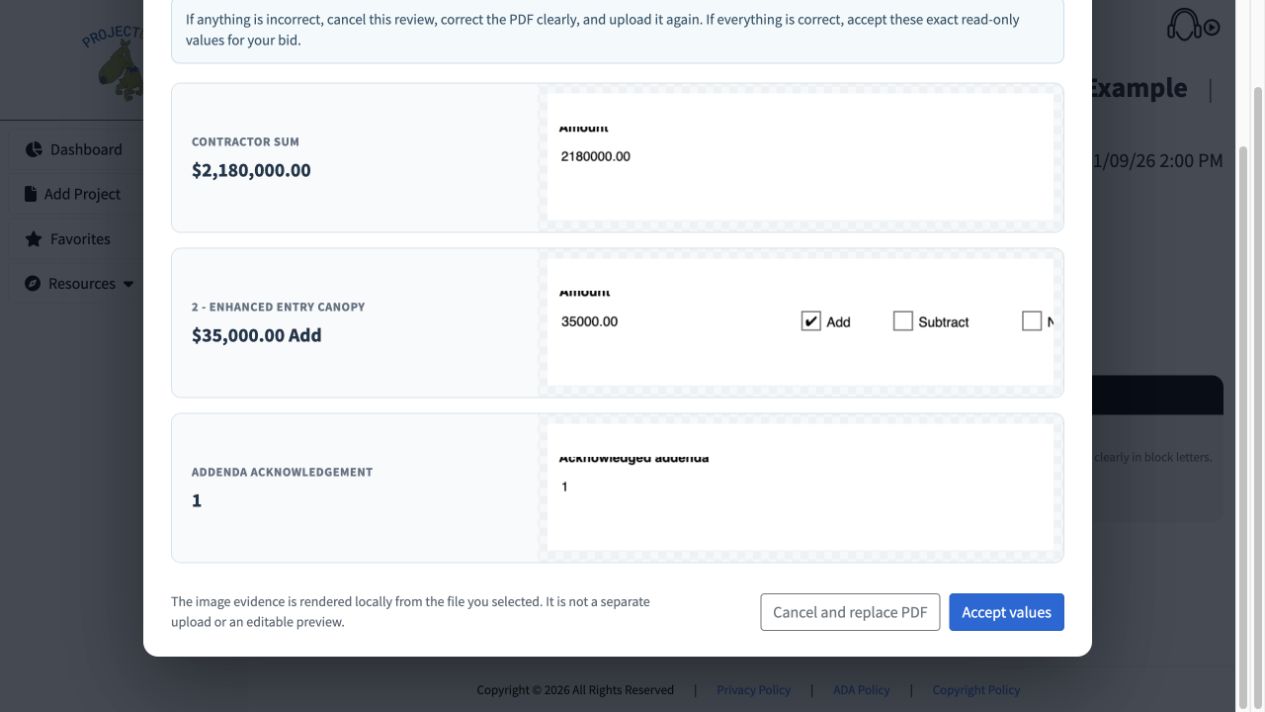
Bidder-facing example: the recognized amount, alternate and addendum are compared with image evidence before acceptance.
 View full-size screenshot ↗
Actual application screens from synthetic Cedar Harbor demonstration projects.
Prepare the project’s coded form
Projectdog prepares the coded template from the required amounts, alternates and addendum fields. The finalized OCR Sub Bid Form or OCR Prime Bid Form is validated before use.
Give Bidders a review step
After upload, the Bidder sees the recognized values alongside evidence from the PDF. Values are read-only; the Bidder accepts them or corrects and replaces the file.
Keep acceptance separate from submission
Accepting the OCR values does not submit the response. The Bidder must still provide remaining required material and complete final submission.
Keep the required artifacts together
The submitted package follows the selected process. For Sub-Bid for GC Use with OCR, it includes the generated Page One and the flattened OCR PDF.
Your next steps
- Work with Projectdog to prepare and validate the coded form.
- Publish the form with the response requirements.
- Receive a submission after the Bidder reviews and accepts its values.
See this workflow for your project
Discuss your procurement process with Projectdog and request a demonstration of the configuration relevant to your project.
Request a demonstration